Source code
Deterministic parsing of useful files, without turning your codebase into an AI chat.
Start an analysis, read a report, choose a format or connect a technical workflow without searching through scattered pages.
CoreAnalyzer applies its supported-language and framework context automatically. A YAML file is optional and only changes explicit scope or thresholds.
CoreAnalyzer maps the project structure before scoring risk. The available sections depend on the languages and files found. Each result stays attached to its category, location and evidence.
No noise for its own sake: a clear evidence base, file by file, line by line.
Deterministic parsing of useful files, without turning your codebase into an AI chat.
Routes, entry points, dependencies and technical signals are mapped before risk scoring.
Findings stay attached to file, line and project context for faster human review.
Files, languages, structure, routes, entry points, dependencies and the detected scope — including every exclusion and its reason — are mapped before risk scoring.
Performance signals, duplications, unused-code candidates and code smells, with context when available.
Routes and APIs, front/back relationships, sockets and real-time flows identified in the project.
Contextual security findings, sensitive files, dependencies, configuration and infrastructure signals.
Symbols proven to be used help establish the project map; they are not listed as anomalies. A statically ambiguous case is presented for review rather than as a confirmed defect.
The overview helps prioritise. The category detail, source location, evidence and confidence level are what support a technical decision.
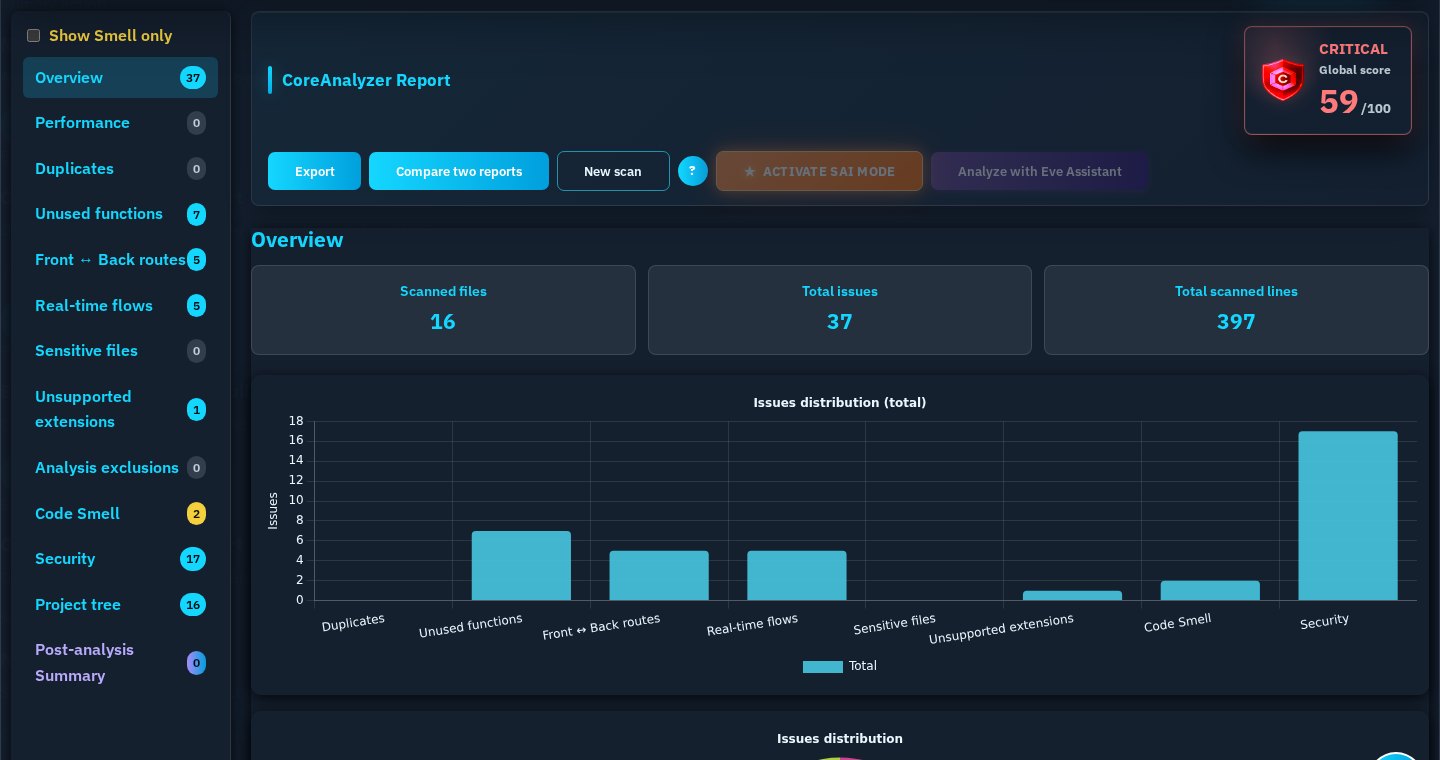
Review included files and the excluded scope, which also covers unsupported formats, before interpreting totals.
Scores and totals orient the review; they do not replace the detailed findings.
Separate architecture, maintainability, application-flow and security questions.
Verify the file, line, reason, available context and confidence before changing code.
Confirm the expected behaviour with your tests or runtime context, then export the report format required by your workflow.
Severity describes the potential impact. Confidence describes how strongly the available static evidence supports the finding.
Severity is based on the reachable action or sink, the assets involved, exposure, visible safeguards and possible consequences. Repetition alone never makes a finding critical.
It starts at 100 and summarises the retained signals in the analysed scope. A higher score means fewer priority signals were retained; it never proves that an application is vulnerability-free.
The native .cdp artifact preserves the CoreAnalyzer report with a verifiable CoreDevPro origin seal. The report remains a reusable technical object: it can be saved, re-imported in the Web interface, compared, used as AI context, then converted to JSON, PDF, HTML or CSV according to the offer. Encrypted .cdp uses AES-256-GCM.
| Format | Primary use | Availability |
|---|---|---|
| Native .cdp | Primary use Native CoreAnalyzer report with a CoreDevPro origin seal and locally verifiable integrity. | Availability Discovery, Essential, Pro and compatible Enterprise access |
| JSON | Primary use Optional structured export for compatible integrations, data processing and authorised agent workflows. | Availability Discovery, Essential and Pro |
| Encrypted .cdp | Primary use Report encrypted locally with AES-256-GCM for sensitive exchanges and storage; the passphrase is not sent to CoreDevPro. | Availability Pro and compatible Enterprise access |
| PDF / HTML / CSV | Primary use Readable or tabular derivatives generated from an open report. | Availability Essential and Pro |
| CycloneDX / SPDX / VEX / Action plan | Primary use Security and compliance deliverables generated when the dedicated export capability is enabled. | Availability Pro and compatible Enterprise access |
Verification uses the public CoreDevPro key registry. It checks the signed origin statement and payload digest without embedding an account email.
coredevpro verify report.cdp coreanalyzer-mcp verify report.cdp Public key registry Public CDP v2 schema
Verification runs locally in the browser. A modified file, invalid signature or unrecognised key is rejected before the report can be opened.
Verify a .cdp reportImport the .cdp from the report-opening area.
CoreAnalyzer displays the CoreDevPro origin, content integrity and declared issue date separately.
The open button stays disabled when tampering or invalid proof is detected.
Available today CoreDevPro origin signature, SHA-256 digest and local verification.
Not active today Qualified eIDAS timestamping. The signed server date is never presented as certification.
SAI is a reading layer for a report already produced by CoreAnalyzer. It organizes structures, routes, dependencies, file/line evidence and technical relationships for prioritisation and investigation, without replacing the analysis.
See the SAI viewOnce a report is open, generate PDF, HTML or CSV usage formats when your plan enables them.
Understand report reuseMCP is reserved for invited Pro accounts, on request. A subscription alone does not activate access. Public registration and remote Git sources remain closed during qualification.
The Streamable HTTP endpoint is active for invited accounts. The local bridge sends a validated archive over HTTPS; public access and remote Git sources remain disabled during the beta.
https://coredevpro.fr/mcp Run this command from the project folder. It signs in, registers the bridge and gives the agent one local action that applies exclusions and YAML, uploads the source corpus and starts the scan. No manual ZIP is required.
npx --prefer-online -y --package=https://coredevpro.fr/mcp-client/coreanalyzer-mcp-0.1.0-beta.17.tgz coreanalyzer-mcp setup --client codex Node.js 20 or later is required; reopen the terminal after installing it. Each command authorizes the current project and updates only the CoreAnalyzer entry. Existing MCP servers and JSONC comments are preserved; credentials never enter the editor configuration.
npx --prefer-online -y --package=https://coredevpro.fr/mcp-client/coreanalyzer-mcp-0.1.0-beta.17.tgz coreanalyzer-mcp setup --client all Uses the MCP configuration shared by the Codex CLI and VS Code extension. This remains the default when no client is specified.
npx --prefer-online -y --package=https://coredevpro.fr/mcp-client/coreanalyzer-mcp-0.1.0-beta.17.tgz coreanalyzer-mcp setup --client codex Writes the official mcpServers entry in ~/.cursor/mcp.json. Cursor IDE and Cursor Agent use the same server definition.
npx --prefer-online -y --package=https://coredevpro.fr/mcp-client/coreanalyzer-mcp-0.1.0-beta.17.tgz coreanalyzer-mcp setup --client cursor Writes the official stdio server entry in the user’s Code/User/mcp.json without replacing other configured servers.
npx --prefer-online -y --package=https://coredevpro.fr/mcp-client/coreanalyzer-mcp-0.1.0-beta.17.tgz coreanalyzer-mcp setup --client vscode Run setup in the environment that can read the project and choose workspace scope. The bridge then runs beside the code while the analysis still uses the standard CoreAnalyzer service.
npx --prefer-online -y --package=https://coredevpro.fr/mcp-client/coreanalyzer-mcp-0.1.0-beta.17.tgz coreanalyzer-mcp setup --client vscode --scope workspace The setup command asks for the regular CoreDevPro credentials in the terminal and stores only the protected account session. Passwords and access tokens are never MCP tool arguments.
CoreAnalyzer checks the plan, project binding, size, active modules and optional YAML before admission.
The scan uses the standard queue and workers. It continues if the agent disconnects and can be followed by its scan identifier.
The agent reads public sections by page; the complete preservation artifact remains the signed, locally verifiable .cdp report.
Without YAML, CoreAnalyzer applies its standard language and framework context. A project YAML included in the folder or archive follows the CLI contract; the MCP does not silently rewrite it.
Read the YAML configuration guideSource data is sent outside the model context, processed by the standard pipeline and purged. The public report snapshot expires after an absolute window of up to ten minutes by default; reading it does not extend that window.
Authentication, scope, quota, upload, scan and report states use stable machine codes with French or English messages. Internal SAI thresholds and discarded signals are not exposed.
Pagination keeps agent context controlled. It never replaces the complete .cdp artifact, whose signed origin statement and payload digest can be verified locally through the bridge.
The security documentation explains the implemented web and CI processing flows, technical retention bounds, report protection and optional third-party post-analysis.